How to track achievements from a C++ backend
 By Mike Dalton ·
Achievement tracking records the milestones players reach in your game: clearing a level, finding a hidden item, defeating a boss. Those records show how far players get, where they stop, and which content they never find.
If your game already talks to a backend you control, that backend is a good place to send achievement events from. Your API token stays on your servers instead of shipping inside the game client, and the integration works the same no matter which engine the client uses.
To show what that looks like, we built game-stats-ai-cpp-example-app, a small HTTP service on Drogon that receives an unlock from the game and forwards it to Game Stats AI. Drogon is a C++17 framework that bundles an HTTP server, an HTTP client, and JSON, so the application code has a single framework to program against. This guide walks through it step by step.
Step 1: Create a server token
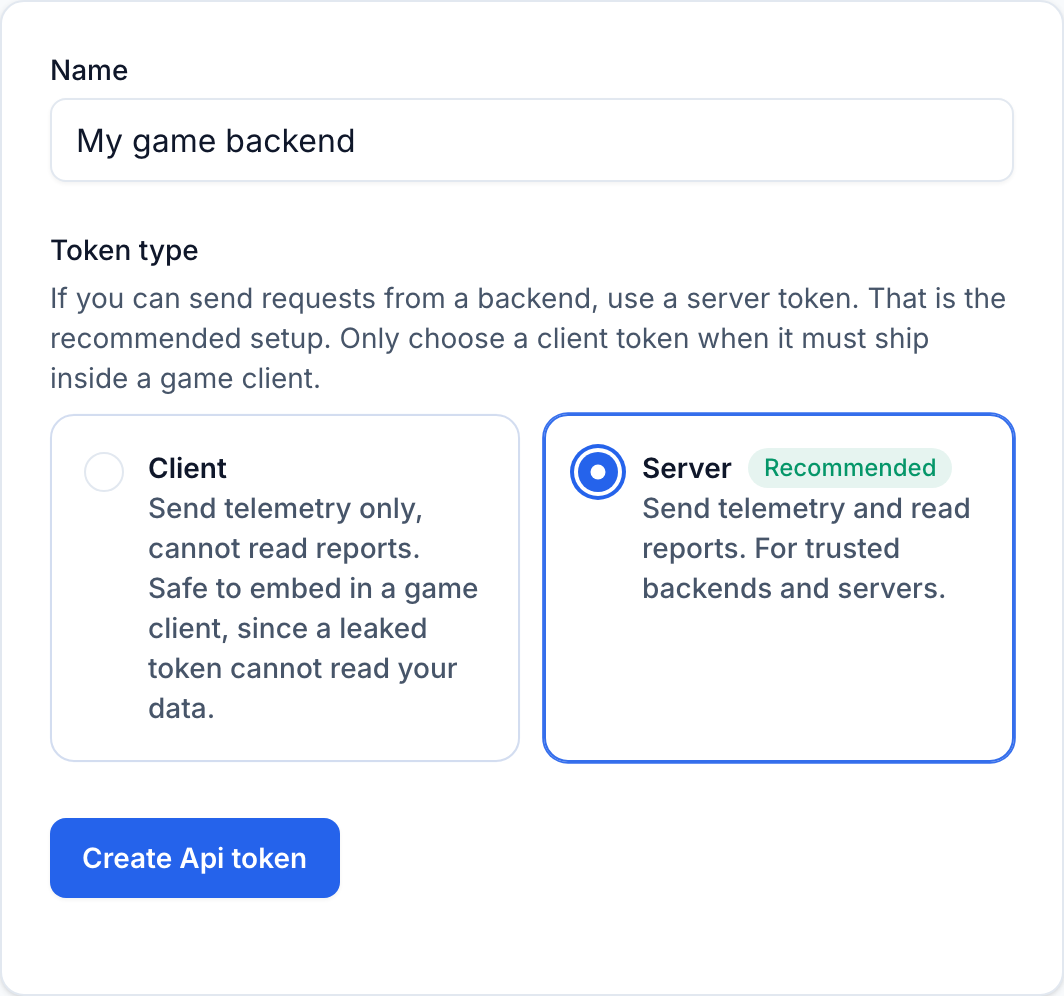
Game Stats AI has two kinds of API tokens. Client tokens can only send telemetry, so they are safe to embed in a game client. Server tokens can send telemetry and read reports, and they must stay on a trusted backend.
Since this code runs on your backend, create a server token at gamestats.ai/api_tokens. The same page shows the account id that the endpoint URL needs.
Step 2: Set up the build with CMake and FetchContent
C++ has no standard-library web server, so the app depends on Drogon. CMake's FetchContent downloads and builds Drogon itself at configure time, so you never install or build the framework by hand.
cmake_minimum_required(VERSION 3.16)
project(game-stats-ai-cpp-example-app CXX)

set(CMAKE_CXX_STANDARD 17)
set(CMAKE_CXX_STANDARD_REQUIRED ON)

include(FetchContent)
FetchContent_Declare(
  drogon
  GIT_REPOSITORY https://github.com/drogonframework/drogon
  GIT_TAG v1.9.13
  GIT_SHALLOW TRUE
)
FetchContent_MakeAvailable(drogon)

add_executable(game-stats-ai-cpp-example-app
  main.cc
  GameStatsClient.cc
)
target_link_libraries(game-stats-ai-cpp-example-app PRIVATE drogon)
Linking against drogon also puts its JSON library on the include path, so the rest of the app can build a request body without any extra wiring. Drogon links three ubiquitous C libraries, jsoncpp, OpenSSL, and zlib, which you install once from your package manager (brew install jsoncpp openssl on macOS, apt-get install libjsoncpp-dev libssl-dev zlib1g-dev on Debian).
Step 3: Store the token and account id in configuration
The app reads the API host, account id, and token from environment variables, so no secrets live in the repository. Set the account id and token wherever the app runs:
export GAMESTATS_ACCOUNT_ID=your_account_id
export GAMESTATS_TOKEN=server_your_token_here
A small struct holds the three values, filled in from the environment. GAMESTATS_BASE_URL is optional and defaults to the production host:
#pragma once

#include <cstdlib>
#include <string>

struct Config {
  std::string baseUrl;
  std::string accountId;
  std::string token;
};

inline std::string envOrDefault(const char *name, const std::string &fallback) {
  const char *value = std::getenv(name);
  return value ? std::string(value) : fallback;
}

inline Config loadConfig() {
  return Config{
      envOrDefault("GAMESTATS_BASE_URL", "https://gamestats.ai"),
      envOrDefault("GAMESTATS_ACCOUNT_ID", ""),
      envOrDefault("GAMESTATS_TOKEN", ""),
  };
}
Reading every value from the environment keeps development and production identical. If you prefer a file for local development, keep the exports in a gitignored file and source it before starting the app.
Step 4: Define the event payload
Game Stats AI accepts achievement events at a single endpoint:
POST https://gamestats.ai/api/v1/accounts/{account_id}/achievement_events
Authorization: Bearer <token>
Content-Type: application/json
The body is four required fields. A struct holds them, and a toJson method builds the snake_case object the API expects:
#pragma once

#include <chrono>
#include <ctime>
#include <json/json.h>
#include <string>

struct AchievementEvent {
  std::string versionName;
  std::string playerUsername;
  std::string achievementName;
  std::string occurredAt;

  Json::Value toJson() const {
    Json::Value body;
    body["version_name"] = versionName;
    body["player_username"] = playerUsername;
    body["achievement_name"] = achievementName;
    body["occurred_at"] = occurredAt;
    return body;
  }
};

inline std::string currentTimestamp() {
  const auto now = std::chrono::system_clock::now();
  const std::time_t seconds = std::chrono::system_clock::to_time_t(now);
  std::tm utc{};
  gmtime_r(&seconds, &utc);
  char formatted[sizeof("2026-08-10T12:00:00Z")];
  std::strftime(formatted, sizeof(formatted), "%Y-%m-%dT%H:%M:%SZ", &utc);
  return formatted;
}
occurred_at is an ISO 8601 timestamp. Formatting gmtime_r output with a trailing Z gives the UTC value the API expects.
Achievements, players, and versions are created the first time they appear in an event, so there is nothing to register in advance. Sending the same achievement for the same player again has no effect, which makes retries safe.
Step 5: Configure the Drogon HTTP client
Drogon's HttpClient is built once from the base URL and reused for every request. A small class keeps it alongside the token and account id:
#pragma once

#include "AchievementEvent.h"
#include "Config.h"
#include <drogon/HttpClient.h>
#include <functional>
#include <optional>
#include <string>

class GameStatsClient {
public:
  explicit GameStatsClient(const Config &config);

  using ResultCallback = std::function<void(std::optional<std::string> error)>;

  void sendAchievement(const AchievementEvent &event, ResultCallback callback);

private:
  drogon::HttpClientPtr httpClient_;
  std::string token_;
  std::string accountId_;
};
The client parses the scheme and host from the base URL, so an https:// URL uses TLS on port 443 without any extra setup. The callback reports either nothing on success or a message describing what went wrong.
Step 6: Send the event and handle the response
The client builds a JSON request, adds the authorization header, and sends it. Drogon's sendRequest is asynchronous, so it never blocks the thread that calls it:
#include "GameStatsClient.h"

#include <drogon/HttpRequest.h>
#include <drogon/HttpTypes.h>

using namespace drogon;

namespace {
std::string joinValidationErrors(const HttpResponsePtr &response) {
  const auto body = response->getJsonObject();
  if (!body || !(*body)["errors"].isArray()) {
    return "unknown validation error";
  }

  std::string joined;
  for (const auto &reason : (*body)["errors"]) {
    if (!joined.empty()) {
      joined += "; ";
    }
    joined += reason.asString();
  }
  return joined;
}
} // namespace

GameStatsClient::GameStatsClient(const Config &config)
    : httpClient_(HttpClient::newHttpClient(config.baseUrl)),
      token_(config.token),
      accountId_(config.accountId) {}

void GameStatsClient::sendAchievement(const AchievementEvent &event,
                                      ResultCallback callback) {
  auto request = HttpRequest::newHttpJsonRequest(event.toJson());
  request->setMethod(Post);
  request->setPath("/api/v1/accounts/" + accountId_ + "/achievement_events");
  request->addHeader("Authorization", "Bearer " + token_);

  httpClient_->sendRequest(
      request, [callback = std::move(callback)](
                   ReqResult result, const HttpResponsePtr &response) {
        if (result != ReqResult::Ok) {
          callback("could not reach game stats");
          return;
        }

        const int status = static_cast<int>(response->getStatusCode());
        if (status == k422UnprocessableEntity) {
          callback("game stats rejected the event: " +
                   joinValidationErrors(response));
          return;
        }

        if (status >= k300MultipleChoices) {
          callback("game stats returned status " + std::to_string(status));
          return;
        }

        callback(std::nullopt);
      });
}
newHttpJsonRequest serializes the struct and sets the Content-Type header, so only the authorization header is left to add. A queued event returns 201 Created with an empty JSON object. A payload that fails validation returns 422 Unprocessable Entity with the reasons, like {"errors":["Achievement name can't be blank"]}, and the client joins them into the reported error. A wrong or missing token returns 401 or 403 with no body, which the client reports as an unexpected status code.
Step 7: Receive the unlock and start the server
Wherever your backend learns about an unlock, call the client and send the event. The example app does that from an HTTP handler that the game client calls:
#include "AchievementEvent.h"
#include "Config.h"
#include "GameStatsClient.h"

#include <drogon/drogon.h>
#include <functional>
#include <memory>
#include <optional>
#include <string>

using namespace drogon;

int main() {
  auto client = std::make_shared<GameStatsClient>(loadConfig());

  app().registerHandler(
      "/players/{username}/achievements",
      [client](const HttpRequestPtr &request,
               std::function<void(const HttpResponsePtr &)> &&callback,
               const std::string &username) {
        const auto unlock = request->getJsonObject();
        if (!unlock) {
          auto response = HttpResponse::newHttpResponse();
          response->setStatusCode(k400BadRequest);
          callback(response);
          return;
        }

        AchievementEvent event;
        event.versionName = (*unlock)["versionName"].asString();
        event.playerUsername = username;
        event.achievementName = (*unlock)["achievementName"].asString();
        event.occurredAt = currentTimestamp();

        client->sendAchievement(
            event, [callback](std::optional<std::string> error) {
              auto response = HttpResponse::newHttpResponse();
              response->setStatusCode(error ? k502BadGateway : k202Accepted);
              callback(response);
            });
      },
      {Post});

  LOG_INFO << "listening on :8080";
  app().addListener("0.0.0.0", 8080).run();
}
The inbound body carries the achievement name and the version name the game client sends, and Drogon passes the {username} path segment as the handler's last argument. The handler fills occurred_at server-side, then hands the event to the client and answers 202 Accepted once the send succeeds.
Sending the event inline is the minimum path. Because Drogon's client is asynchronous, the handler already answers without waiting on a thread, and resending an unlock has no effect, so retrying a failed send is safe to add.
The complete project is in game-stats-ai-cpp-example-app.